Magic Pen Tool

Magic Pen Tool

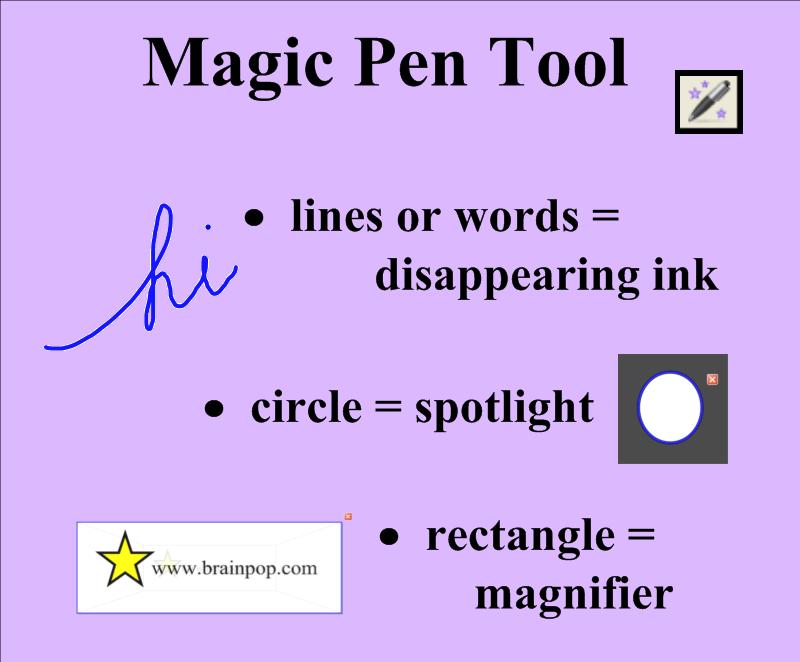
The Magic Pen tool is an additional gadget in the latest version of SMART Notebook™.  It allows users to spotlight, to magnify, and use disappearing ink.  Simply click on the Magic Pen icon on the top toolbar with your finger (or mouse cursor) to select this function.  Then use your finger to write a word or draw a line.  After a few seconds, the magical blue ink vanishes!  Draw a complete circle and a spotlight will appear.  The size and location can be altered by dragging up/down, left/right in the center of the circle.  Draw a complete rectangle, and you’ll get a magnifying tool.  Play around with this amazing feature, and you’ll find many ways to use it in your teaching.

SMARTtech™.com

Searching through various websites with SMART Board™ lessons can be overwhelming.  Allow me to showcase one site at a time to help you navigate these collections.

www.SMARTtech.com

My favorite resource for pre-made SMART Board™ lessons is www.smarttech.com.  It allows you to filter your search by grade and subject.  You can also view Two-Minute Tutorial videos or read Quick Reference Guides on the basic features of SMART Notebook™ and other SMART™ products/software.  Here are the direct links to the ones I’d recommend for new users.

SMART™ Lesson Activities (U.S.)

SMART Notebook™ 10 Toolbars Quick Reference Guide

SMART Notebook™ 10 Gallery Quick Reference Guide

SMART Notebook™ Software Learner Resource
This is a 38-page booklet with everything a new user needs to know to get started.