Got Wordle?

Wordle

Wordle, www.wordle.net, is a website for creating word clouds.  Simply type in a series of words using commas.  The more often the word is included, the larger it will appear in the final word cloud.  Then customize the themes, fonts, and colors.  Use the SMART camera tool to take a picture and add it to your SMART file.  There are a variety of classroom applications.  Ask your students to write down five words to describe a character from a story, a scientific concept following the unit of story, or an upcoming holiday.  This can be an individual or small group task.  Or create a Wordle on a topic of study and use it to preview the chapter.  Students can view it and make connections to prior knowledge.  Or type each of your student’s names to create a class word cloud that can be an image on your classroom website or your classroom computer’s desktop background.  TIP:  Type your words in a Word document and paste them into the field on the site.  Because if you decide to “go back” and add, delete, or change words, you will be sent back to the home page.  Your work is not saved on the site.  Also, for two words that you’d like to stay together such as United States, put a ~ between the words (United~States).

Pete’s Presentations

Phillip Martin has outdone himself with his collection of sites offering educators FREE PowerPoint presentations, education websites, and clipart.  The main site, Pete’s PowerPoint Station, has links to numerous resources.  I’d recommend viewing all of the themes and topics at Pete’s Presentations because you can look at all of the possibilities.  Sub-sites include Gretta’s Game Station and Hannah’s Homework Help Station.  Don’t miss the clipart link.  Mr. Martin’s unique, colorful cartoon style appeals to all children.

As long as you use it for your classroom (newsletters, website, interactive whiteboard lessons, self-made worksheets, etc.), these amazing resources are yours at no cost.  He does ask that you tell someone else about the site.  I’d say that is the least we can do to thank Mr. Martin for his outstanding artistry and organization.  This is a teacher’s jackpot!

Pete’s Presentations
http://www.pppst.com/themes.html

Gretta’s Games
http://games.pppst.com/index.html

Hannah’s Help
http://resources.pppst.com/index.html

Graffiti Wall

I sometimes use a traditional paper graffiti wall to accompany a novel study, read aloud, or thematic unit.  It gives students an opportunity to express their thoughts in words and pictures and promotes a written discussion.  The SMART™ Board takes this activity to another level.  For a chapter book, you can have multiple SMART Notebook™ pages, one for each chapter.  The larger electronic version of a graffiti wall also allows you to more easily discuss posted comments and questions with the entire class.  It can be left up for students to use while the teacher reads aloud, during silent reading, or as a literacy station activity.

BrainPOP

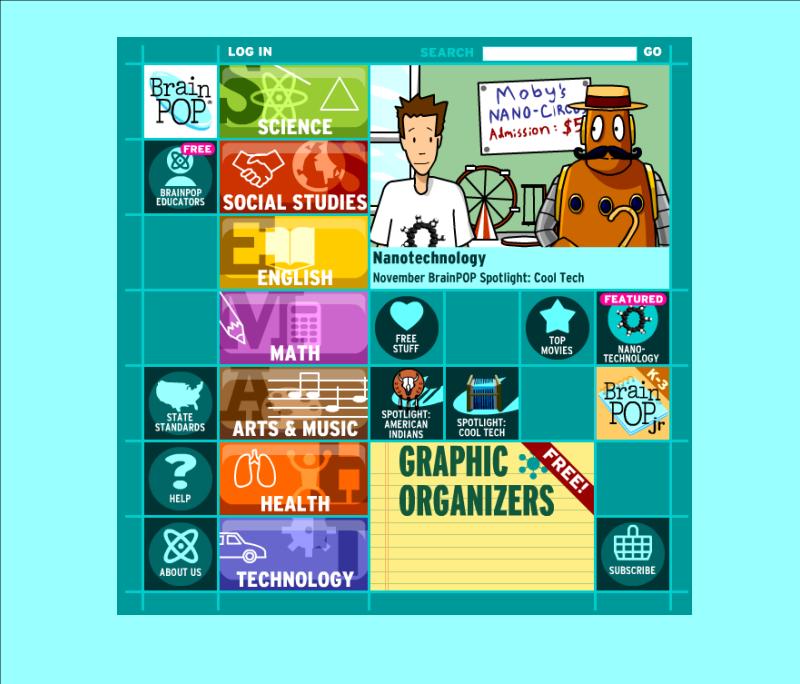
BrainPOP

Let Tim and Moby escort you and your students on a topical adventure! Use these approximately two- to five-minute animated videos at BrainPOP to enhance your reading, writing, English, math, science, social studies, art, music, technology, etc. lessons. The best feature is the ten-question multiple-choice quiz that follows each video. Get all of your students involved in responding to these comprehension checks! Activity ideas and worksheets accompany each topic as well. This is one of my favorite sites to support the skills and topics of study I teach. While you’ll need to purchase a subscriptions to fully take advantage of this site (and its partner sites BrainPOP, Jr. and BrainPOP, Espanol), there are several free videos. Click on “Free Stuff” to see it all. BrainPOP, Jr. is intended for K-3 grades and BP is geared toward 3-12 grades. Preview the video you think you’d like to show before airing it. Sometimes the vocabulary and content is too challenging for my third graders, so not all videos are appropriate to show.  You’ll also want to register for the free “BrainPOP Educators.”  Gain access to all of the activity pages, various graphic organizers, ideas for using BrainPOP in your classroom, and a lot more!